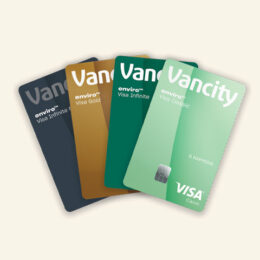
Linking your enviro Visa card
You can add your enviro Visa cards to online banking or mobile app yourself.
Once you’ve added your cards and updated the app, your cards will be visible in under ‘Accounts’ in the mobile app.
Yes. To view your enviro Visa Classic, enviro Visa Gold, enviro Visa Infinite* or enviro Visa Infinite Privilege* card in Vancity online banking or the mobile app, you’ll need to log in with your MEMBER CARD® debit card number and PAC number. If you haven’t set up your online banking yet, visit your nearest community branch to get started.
If you’re not a Vancity member or you have a business use Vancity enviro Visa card, you can view your Visa account online through the Manage my Visa card website.
Accessing your enviro Visa account details
Primary Cardholders and Authorized Users of enviro Visa Classic, enviro Visa Gold, enviro Visa Infinite* and enviro Visa Infinite Privilege* cards do not have the same access to their Visa account information.
Everyone has access to:
- The current balance, available credit and credit limit
Authorized Users have access to:
- Only their pending and posted transaction details. They’ll be able to view and download transactions for up to 12 months (from the first time they make a transaction).
Primary Cardholders have access to:
- All account information including the current balance, available credit, credit limit, statement balance, payment history and more
- All pending and posted transaction details for the past 12 months including transactions from Authorized Users on their account. They’ll be able to view and download the transactions.
- Reward points balance from the previous evening and a link to the rewards website where they can redeem points
- eStatements (desktop only) which can be viewed or downloaded as PDFs (eStatements) for up to 18 months
Not sure if you’re a Primary Cardholder or an Authorized User? Learn more about Primary Cardholders and Authorized Users.
This is the amount of points you earned during the previous statement cycle. This amount is already accounted for in the ‘Total points’ amount that appears above ‘Points earned on last statement’.
Don’t worry – your ‘Total points’ amount is accurate and includes the points earned on your last statement.
When you view your Visa account activity in online banking and the mobile app before your next billing date, the ‘Points earned on last statement’ amount will temporarily show as ‘0’ (zero). You’ll see the correct balance under ‘Points earned on last statement’ when your next statement is produced.
To view your Visa eStatements in online banking:
- Log into online banking
- Click ‘View eStatements’ from the menu on the left side of the screen
- Click ‘Visa Statements’ from the menu on the left side of the screen
Only Vancity members who are Primary Cardholders can view their enviro Visa Classic card, enviro Visa Gold card, enviro Visa Infinite* card and enviro Visa Infinite Privilege* card eStatements in online banking (Personal banking for Vancity members). eStatements are not available in the Vancity mobile app.
Want to go paperless? Learn how to opt-out of your paper Visa statements.
No. Sometimes a merchant submits an authorized transaction that doesn’t exactly match the posted transaction. As a result, for up to 7 days afterwards, the transaction will show in both the pending and posted transactions, and reduce the available credit for up to 4 days.
For example, if you pre-authorize a fuel purchase for $100 and only pump $40 worth of fuel:
| Day | Action | Impact |
| 1 | The pre-authorized transaction will immediately appear under Pending transactions for the pre-authorized amount. | Available credit: Decreases by $100 Current balance: No change |
| 2-3 | When the transaction gets posted a few days later, the transaction will appear under Posted transactions for the actual amount charged. | Available credit: Decreases by an additional $40 ($140 total) Current balance: Increases by $40 |
| 7 | Seven days after the pre-authorized transaction, the pre-authorized transaction will be removed from Pending transactions. | Available credit: Increases by $100 ($40 total) Current balance: No change |
Yes. If you want to view enviro Visa Classic card, enviro Visa Gold card, enviro Visa Infinite* card or enviro Visa Infinite Privilege* card within the mobile app, you’ll need the latest version of the mobile app. You can install or update your app in the Google Play or App Store.
No, you won’t be able to view your enviro Visa account statement balance on your Apple Watch.
Making enviro Visa card payments
To pay for your enviro Visa card bill in Vancity online banking or the mobile app:
- Review your Visa statement balance by logging into vancity.com or the mobile app and checking the Credit Cards section
- Make sure your enviro Visa card is one of your Payees. If not, add a new Payee
- Select ‘Pay bills’ from the menu
- Complete the form and confirm your payment
Like any other normal bill payment, the funds will be taken from your Vancity account immediately. A few minutes later, the payment will appear in your Visa Card Activity as a Pending transaction and your Available credit will increase by the payment amount.
It takes up to 24 hours for your Current balance to decrease by the payment amount and a few days for the payment to move from Pending transactions into Posted transactions in online banking. Finally, your Statement balance, Minimum payment and Payment due date will be updated when your next monthly statement is generated.