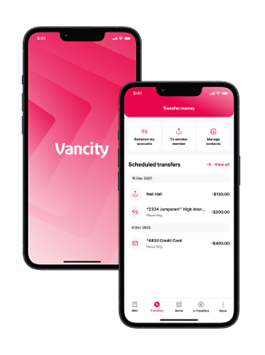
New interface, new features
Coming soon to your desktop and mobile devices, Vancity’s new Digital Banking experience will feature intuitive menus, a modern new look, and new convenient and secure features unlocked. Click here to learn more.
FAQ
Access and getting started
We’re rolling out in phases. You’ll receive an email and a secure banking message when it’s your turn. No action is needed until you hear from us; however, there are a few steps you can take now to help ensure a smooth transition.
To-dos for getting ready.
All chequing and savings accounts will be listed under “Everyday Banking.” Nicknames seamlessly help keep track of specific accounts for easy identification.
Learn how to create nicknames for your accounts
Your current list of member-to-member transfer contacts will not be carried over. To set them up again, you will need to find their 12-digit Financial Account Number (FAN) in your past transactions and add them manually in the new mobile app or desktop website.
Please note: We are unable to provide FANs for other members due to privacy regulations.
You will not longer be able to receive e-Transfers manually in the old mobile app – only on desktop and mobile web or automatically using Autodeposit. To keep your transfers flowing smoothly, set up Autodeposit or use desktop/mobile web until your mobile app is updated.
Learn how to set up autodeposit
If this isn’t set up, you won’t be able to reset your password online. You will need to call us or visit a branch for help, so take a moment to enable it now.
What’s changing & what’s new.
- All chequing and savings accounts are now grouped under Everyday Banking for easier access.
- Add nicknames to accounts for quick identification.
- Your Relationship Number is now in Profile > Account Details.
New features:
- Pay or schedule multiple bills at once (now on mobile).
- Save intermember contacts for faster access.
- Flexible transfer options: daily, weekly, monthly, etc.
- Share account info easily for preauthorized transactions.
- Save multiple Member card numbers on mobile for quick sign-in.
- Add nicknames for bill payees.
- Manage credit cards: activate, lock/unlock, and dispute transactions.
- Switch between light and dark mode.
- View debit and point-of-sale limits in real time.
To sign in for the first time, have these ready:
- Personal Access Number (Member card number).
- Password.
- Multi-factor authentication (MFA) code. Your existing MFA settings will carry over, so you’ll receive the code on your usual device.
- Enable your password reset security question. If this isn’t set up, you won’t be able to reset your password online. You will need to call us or visit a branch for help, so take a moment to enable it now.
- After logging in, re-enroll in biometric sign-in (fingerprint for Android or Face ID for iOS) by following the on-screen prompts.
Due to app store restrictions, the app is only available in regions set to Canada or the U.S. If you’re outside these countries, you’ll need to update your app store region.
Here’s how to change your app store region:
- iOS: https://support.apple.com/en-ca/HT201389
- Android: https://support.google.com/googleplay/answer/7431675
Important: Before updating your location:
- Spend any remaining account balance
- Cancel active subscriptions
- Add a payment method for your new country or region
Security & privacy.
Yes. The new platform uses multi-factor authentication, end-to-end encryption, and continuous monitoring to keep your accounts safe. We’ll never ask for your password or one-time codes by email or phone.
We follow strict privacy policies and never share your information without consent. You can review our privacy policy at any time.
Need help?
If you have any questions or need technical support, please contact our Member Services Centre.
Toll-free: +1-888-826-2489
Local: +1-604-877-7000