How do I Go Paperless with eStatements?


You can now access and download your eStatements through online banking (desktop only – PC or laptop). They look identical to paper statements and are convenient, environmentally-friendly and secure.

Benefits of eStatements

  • View, download or print eStatements through online banking as soon as they are available
  • Statements are stored securely in online banking for seven years
  • Reduce paper waste and clutter
  • Reduce the risk of your printed statements being lost or stolen
  • Free of charge (some account holders will be charged a monthly paper statements fee, effective March 1, 2024. See details).

How to opt-out of paper statements

For Vancity banking accounts

Online Banking (step-by-step guide)

You can opt out of paper statements in online banking via PC, laptop, or mobile (via browser) by completing the Paper Statement Preferences form.

Log in to online banking:

  1. click “Account Services”
  2. click “Change Statement Options”
Update your statement preferences:

  1. click drop down menu and select the Relationship number that you’d like to sign up for
  2. select the option “Stop mailing me paper statements…”
  3. enter your email address
  4. click “Continue”

Note, you will not receive the e-Statement in the email. Email is for notification only and you’ll need to log in to online banking to download.

Review your information:

  1. click “I Agree”
DONE

Visit your local community branch and our staff would be happy to help you update your statement preferences.

Call the Member Services Centre at 604-877.7000 or toll free at 1.888.826.2489.


For enviro Visa accounts

  1. Log in to Manage my Visa card.
  2. Select the blue “Statement preferences” link on the right side of the account summary (main) screen.
  3. Check that the email address listed further down the page is correct.
  4. Toggle “Paper statements” off.

Don’t have a “Manage my Visa card” account? Learn more about accessing your enviro Visa accounts online


Note: It may take up to six weeks for the change to take effect.


How to view your eStatements

Once you opt-out of paper statements, you’ll receive an email every time your eStatements are ready to view online. You can access them in online banking under ‘My Accounts’ and ‘View e-Statements’.

Go Paperless (e-Statement)


Can I continue receiving paper statements?

You can continue receiving paper statements or switch back to paper statements from eStatements at any time, however, some account holders will be charged $2.50 per month for each paper statement starting on March 1, 2024.

Exclusions apply:

You will not be charged a Paper Statement Fee in a month in which:

  1. You are within the first two years of Membership as part of the Refugee Assistance Program.
  2. Your Membership type is a Trust, Estate, or Accessibility.
  3. Any account holder is age 18 and younger or age 70 and older.
  4. Your chequing or savings account(s) had a negative balance at close of business/end of day. This includes lines of credit and overdraft.

Read more in the Service Charge Bulletin.

You can now access and download your eStatements through Online Banking (desktop only – PC or laptop). They look just like paper statements and offer a convenient, secure, and environmentally friendly alternative.

Benefits of eStatements

  • Instant access: View, download or print eStatements through online banking as soon as they’re available.
  • Secure storage: Statements are safely stored in Online Banking for seven years.
  • Eco-friendly: Reduce paper waste and clutter.
  • Enhanced security: Lower the risk of printed statements being lost or stolen.
  • Free of charge: Some account holders will be charged a monthly paper statements fee, effective March 1, 2024. See details.

How to opt-out of paper statements

For Vancity banking accounts

Online Banking (step-by-step guide)

You can opt out of paper statements in Online Banking using a PC, laptop, or mobile browser by completing the Paper Statement Preferences form.

Step 1:

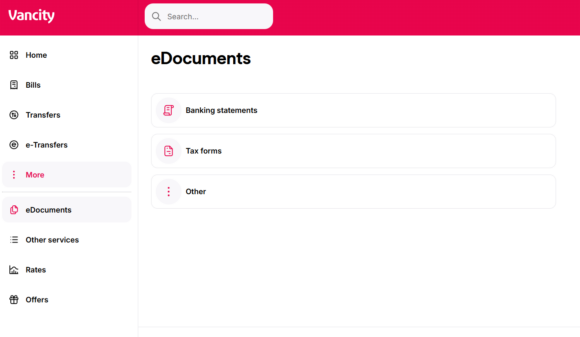
Log in to Online Banking then click More. Select eDocuments and click Banking statements.

Step 2:

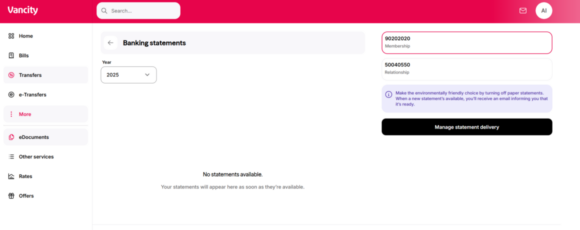
Update your statement preferences by selecting the account you want to manage and clicking “Manage statement delivery”.

Step 3:

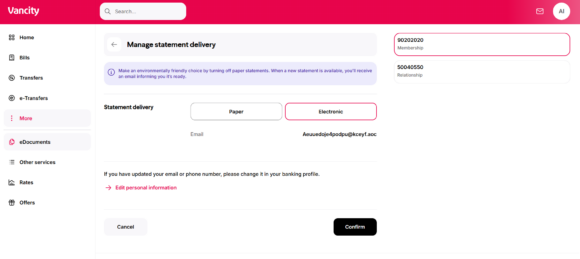
In Statement delivery, select “Electronic” and click “Confirm”.

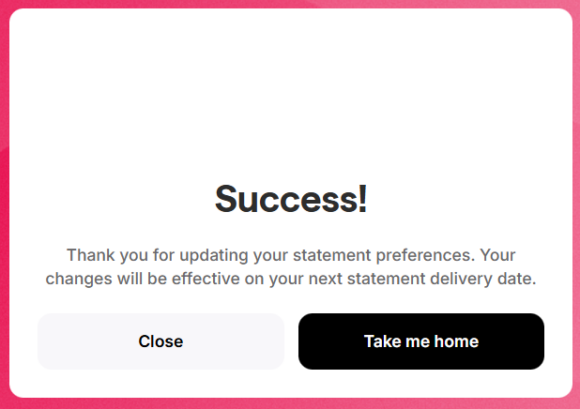
A success message will indicate that your changes will take effect on your next statement delivery date.

Visit your local community branch and our staff would be happy to help you update your statement preferences.

Call the Member Services Centre at 604-877.7000 or toll free at 1.888.826.2489.


For enviro Visa accounts

  1. Log in to Manage my Visa card.
  2. Select the blue Statement preferences link on the right side of the account summary screen.
  3. Verify that the email address listed further down the page is correct.
  4. Toggle Paper statements to Off.

Don’t have a Manage my Visa card account? Learn more about accessing your enviro Visa accounts online


Note: It may take up to six weeks for the change to take effect.


How to view your eStatements

Once you opt-out of paper statements, you’ll receive an email notification whenever your eStatements are ready to view. You can access them in Online Banking under ‘My Accounts’ and ‘View e-Statements’.
Go Paperless (e-Statement)


Can I continue receiving paper statements?

You can continue receiving paper statements or switch back from eStatements at any time. However, starting March 1, 2024, some account holders will be charged $2.50 per month for each paper statement.

Exclusions apply:

You will not be charged a Paper Statement Fee in a month in which:

  1. You are within the first two years of membership under the Refugee Assistance Program.
  2. Your membership type is Trust, Estate, or Accessibility.
  3. Any account holder is 18 or younger or 70 or older.
  4. Your chequing or savings account(s) had a negative balance at close of business/end of day. This includes lines of credit and overdraft.

Read more in the Service Charge Bulletin.

  • Was this article helpful?
  • Yes   No