How do I enable push notifications with the Vancity mobile app?

Online banking alerts can help protect you from fraud.

Set up push notifications on your smartphone and be alerted when changes are made to your account.

Here’s how:


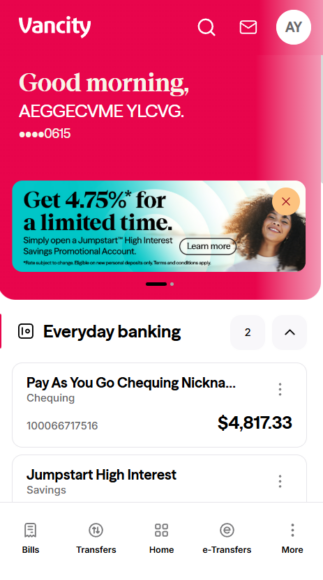
Step 1: Log in to the Vancity mobile app.

  • Tap your profile icon at the top right.
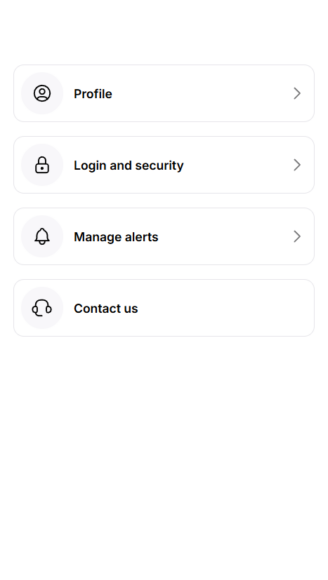
Step 2: Update your settings.

  • Tap “Manage alerts”
 
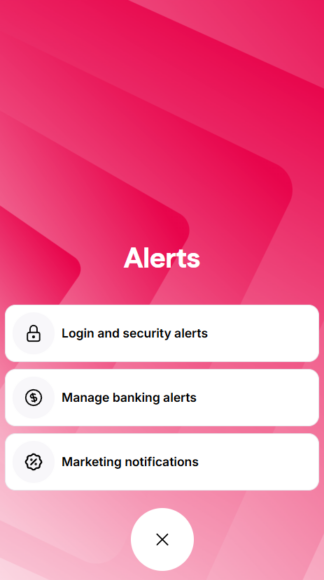
 Step 3: Tap “Manage banking alerts”.  
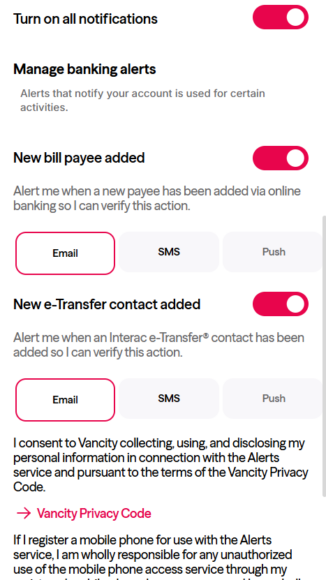
 Step 4:


  • Tap “Turn on all notifications”.
  • Tap the notifications you would like to enable.
  • Scroll down and continue to finalize.


  • Was this article helpful?
  • Yes   No

Do you still need help?

Search

Call us