
Easy steps to switch your banking
Now that you’ve opened your new account, we’re here to help you move your services to Vancity quickly and easily.
To log in for the first time on vancity.com or the Vancity mobile app:
- Enter the last 10 digits of your MEMBER CARD® debit card number (include zeros, omit spaces).
- Enter your temporary Online Banking password.
- You’ll then update your password and set up multi-factor authentication.
Review the checklist below for items you can set up once you receive your new Vancity debit card.
For a complete step-by-step guide and links to download the Vancity mobile app for Apple or Android, visit: vcsupport2025.yourballistic.com/gettingstarted/
Setting up a direct deposit is simple:
- Log in to Online Banking.
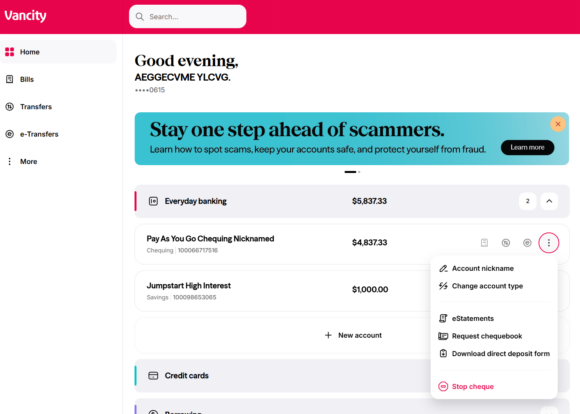
- Download a void cheque, which contains all the account details you need.
- Provide the void cheque to your employer or income provider to update your deposit information.
What you’ll need to set up a direct deposit
To set up a direct deposit, you’ll need your account details. The easiest way to get them is by downloading a void cheque through Online Banking. All the necessary information will be included on the form.
How to download your void cheque:
|
 |
You’ll need to provide your new account information to your employer and other organizations that deposit automatic payments (like government benefits).
- You full name and address as it appears on your account statements
- Vancity’s Financial Institution Number: 809
- The account number you’d like your pre-authorized payment to be paid from
How to find your account and transit number
- Your transit number
- Your branch address
We also have an easy way to update the Canada Revenue Agency (CRA) with your direct deposit information through Online Banking. In the left-hand menu, select Account Services > Set up CRA Direct Deposit.
Here are some examples of possible automated direct deposits:
- Employer payroll
- Government benefits – change your sign-in partner to Vancity for CRA
- Brokerage deposits
- Child support
Pre-authorized payments are a convenient way to ensure your regular bills are paid on time, every time. They help you avoid late-payment penalties and eliminate the need to manually pay recurring bills. Plus, they can even support maintaining or improving your credit score.
Void cheque
Some service providers may require a void cheque to set up pre-authorized payments. You can easily download one by following the instructions below.
How to download your void cheque:
|
|
You’ll need to provide them your account information:
- You full name and address as it appears on your account statements
- Vancity’s Financial Institution Number: 809
- The account number you’d like your pre-authorized payment to be paid from
How to find your account and transit number
- Your transit number
- Your branch address
Here are some examples of possible automated direct deposits:
|
|
|
|
Want to talk about managing your cashflow, setting up automatic savings plans or moving your other investments to Vancity? New members may also be eligible for offers and pre-approvals when applying for an enviro™ Visa* card or line of credit.
Visit our website for more info on the services we offer. We are here to help you get in good financial shape with advice and planning.
If you already have a TFSA/RRSP/RRIF, fill out these forms and book an appointment with us to bring them over!
If you want more information, you can call us at the numbers below.
Our Member Services Centre is staffed by member service specialists ready to serve you 7 days a week. Monday to Saturday 8 am to 8 pm; Sunday 10 am to 5:30 pm.
Metro Vancouver 604.877.7000
Greater Victoria 250.519.7000
Toll-free 1.888.826.2489
We’re here to help. Please contact us and we’ll make sure you get the information you need, or book an appointment with us.
Related posts:
 How do I find my branch/transit number, financial institution number and account number?
 How do I set up Canada Revenue Agency (CRA) direct deposit to receive government benefits in my Vancity account?
 How do I add an additional account in online banking? i.e. term deposit or chequing/savings account
 How do I transfer funds to another member?