Visa Spend Clarity for Business offers automation and tools to save time and keep business spend on track.
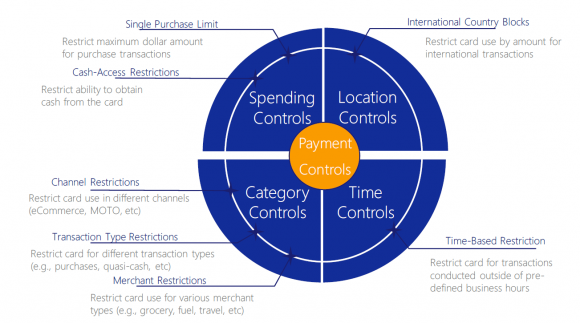
You can manage spending, categorize expenses and add receipts via desktop or mobile app. You can also set up and manage employee cards with personalized spending controls and transaction limits. You get to decide where, when and how each individual cards are to be used by setting limits on merchant category, location, dollar amount spent and business hours. You also get a clear view and full control of your employees’ expenses on the go with near real-time alerts and notifications of spend.
Visa Spend Clarity for Business key features are:
- Dashboards and reporting
- Payment Controls* and alerts
- Integration with accounting software
- Mobile app with receipt capture
* Visa Payment Controls supports a wide range of authorization blocking, giving you ongoing control over what payments are accepted.
Visa Business Solutions is an online portal that enviro Visa Business and enviro Visa Infinite Business cardholders can use to access Visa Spend Clarity for Business.
To register for Visa Spend Clarity for Business, you will need to create an account on Visa Business Solutions.
IMPORTANT INFORMATION: The first person to sign up for this tool will be set as the Business Administrator for the business, giving them the rights to view all card accounts that belong to the business. The Business Administrator can add new employee’s cards, set spending rules, notifications and reporting for each employee card, along with administrative privileges such as add users, assign roles and provide password support.
The Business Administrator can assign the following roles to the Business Users to separate duties and support the business needs:
- Business Auditor: Provides read-only access to all card expenses for the Company without administrative privileges such as adding a new user. This role can be assigned to an accountant.
- Business Cardholder: Role assigned to users that manage a single card issued under the Company’s card account. This is for users who only need to track expenses for their own card.
For more information on how to register and use the tool, read the Visa Spend Clarity Getting Started Guide.
Visa Spend Clarity for Business can be accessed online through Visa Business Solutions site.
Contact Card Services Toll free within Canada or the U.S.
For more information on how to register and use Visa Spend Clarity for Business, read the Visa Spend Clarity Getting Started Guide.
You can also contact Card Services Toll free, within Canada or the U.S, by giving Card Services a call at 604-877-4999 or toll free at 1-800-611-8472, and one of our representatives will be happy to help.
- Visit the Visa Business Solutions site.
- Enter your valid Username.
- Click on “Forgot Password?”
- Follow prompts.
- Visit the Visa Business Solutions site.
- Click on “Forgot Username?”
- Follow prompts in pop-up window (ensure you enter the same email address that was used to set up the account).
Visa SavingsEdge offers enviro Visa Business and enviro Visa Infinite Business cardholders a new and convenient way of receiving discounts on qualifying purchases at participating merchants. Discounts require no coupons or codes, because they are applied as statement credits on enrolled Visa Business cardholders’ future account statements.
Visit www.visasavingsedge.ca to enrol, and to see a full list of participating merchants and their terms and conditions.
There is no fee to enrol in the Visa SavingsEdge program. Simply register your valid enviro Visa Business or enviro Visa Infinite Business card on www.visasavingsedge.ca and start enjoying discounts at participating merchants.
Visit www.visasavingsedge.ca to enrol, and to see a full list of participating merchants and their terms and conditions.
- Visit visasavingsedge.ca
- Click “Enroll Now”
- Enter in the form your Business information.
- You will be required to read and accept the program Terms and Conditions on your own behalf and on behalf of your business to complete your enrollment.
- Click “Submit”
Visit www.visasavingsedge.ca