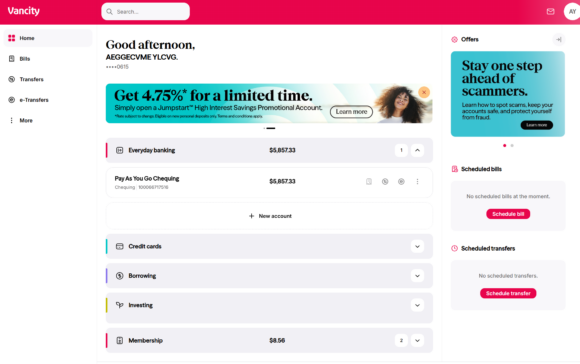
How do I view my Aviso Wealth or Qtrade Direct Investing accounts in online banking?

Effective April 1, 2024, Credential Securities and Credential Asset Management have merged under the new name Aviso Wealth.

If you have accounts with any of the service partners listed below that are managed by Vancity, you can link those accounts to view transaction history, balances, and account details in Vancity Online Banking, giving you a more complete picture of your finances.

Segregated fund products available through Vancity Life Insurance Services Ltd. can also be added by selecting the “Aviso Wealth” link.

Please note:

  • This feature is currently available only for personal banking members.
  • It is not available in the Vancity Mobile App.
  • Accounts held in trust are not eligible.

Step 1:


  • Login to Vancity Online Banking by entering the last 10 digits on your Vancity MEMBER CARD® debit card and your PAC # (Personal Access Code)
  • To add your Aviso Wealth or Qtrade account, navigate to ‘Account Services’ in the left-hand menu, then select Manage Partner Accounts. (Alternatively, scroll down the Account Summary page until you find the Aviso Wealth or Qtrade Direct Investing headers and click Add/Remove Accounts).


Step 2:


  • On the Manage Partner Accounts page, click on the service provider name for the account you wish to add, e.g. Aviso Wealth


Step 3:


  • Enter the Client ID from the service partner account. This information can be found on your most recent statement.
  • For Aviso Wealth, the first six digits of your account number is your Client ID, without a hyphen (e.g. if TFSA Account Number is 1A1-111-A-1, enter 1A1111).
  • If you have registered for Aviso Wealth online access, you can retrieve this information online:
  • Aviso Wealth Online
  • Qtrade Direct Investing
  • Review the personal information pre-populated from our banking system.
  • If correct, click Continue. If incorrect, contact the Member Services Centre.

Step 4:


  • If the account links successfully, you will be redirected to a confirmation page.
  • If an error occurs, contact the Member Services Centre.


Step 5:


  • Once linked, click My Accounts to view your investment accounts.
  • The balance shown reflects the last closing price.

  • For Aviso Wealth: Contact your Vancity Wealth Advisor, Wealth Planner, or Wealth Relationship Manager, or call 1-855-714-3800.
  • For Qtrade Investor: Call 604-605-4199 or 1-877-787-2330, Monday to Friday, 5:30 AM to 5 PM (PT).


Contact details in your Vancity profile must match your partner account profile. Please contact the Member Services Centre.

  1. Clear your browser cache.
  2. Log out and log back in.


Aviso Wealth accounts are view-only. To add funds, book an appointment with your advisor. Qtrade Direct Investing supports bill payments.

  1. Navigate to Manage Partner Accounts under Account Services
  2. Select the partner
  3. Click Remove
  4. Click Continue

Legal disclosure

For your convenience, Vancity provides a service to link Aviso Wealth and Qtrade Direct Investing accounts. Vancity accepts no liability for accuracy. Mutual funds and securities are offered through Aviso Wealth. Online brokerage services are offered through Qtrade Direct Investing.

Step 1:


  • Log in to Vancity Online Banking using the last 10 digits of your MEMBER CARD® and your PAC.
  • Scroll to Investing, select Aviso Wealth, and choose Link Accounts.
  • Enter the Client ID from your service partner account.
  • For Aviso Wealth, use the first six digits of your account number without hyphens.
  • If registered for online access, retrieve it at:
  • Review pre-populated personal information.
  • If correct, click Continue. If incorrect, contact the Member Services Centre.


Step 2:
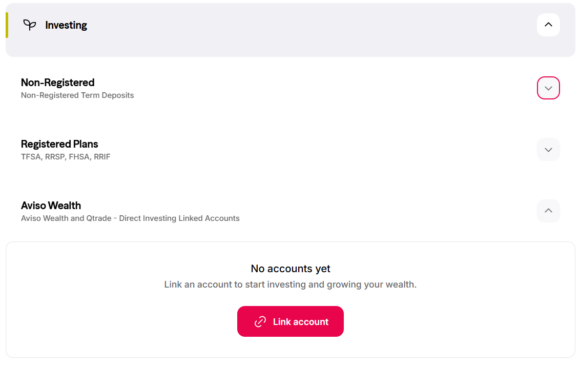


  • If linking succeeds, you will see a confirmation page.
  • If an error occurs, contact the Member Services Centre.
  • Click Investing then Aviso Wealth to view accounts.
  • The balance reflects the last closing price.

  • For Aviso Wealth: Contact your Vancity Wealth Advisor or call 1-855-714-3800.
  • For Qtrade Direct Investing: Call 604-605-4199 or 1-877-787-2330.


Contact details in your Vancity profile must match your partner account profile. Contact the Member Services Centre.

  1. Clear your browser cache.
  2. Log out and log back in.


Aviso Wealth accounts are view-only. Qtrade Direct Investing supports bill payments.

  1. Go to Manage Partner Accounts under Account Services
  2. Select the partner
  3. Click Remove
  4. Confirm

Legal disclosure

Vancity provides this linking service for convenience and accepts no liability for accuracy. Mutual funds are offered through Aviso Wealth. Online brokerage services are offered through Qtrade Direct Investing.

  • Was this article helpful?
  • Yes   No