Your digital banking experience is designed to be simple and customizable. This guide will help you personalize your settings, update your profile, and understand how your accounts are organized.
How do I switch between dark and light mode?
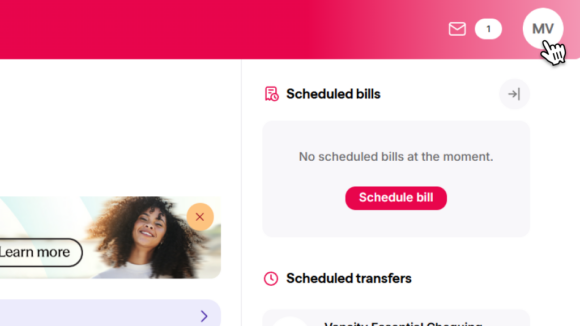
Step 1:
In the top menu, select the circle member icon to open the Settings menu.
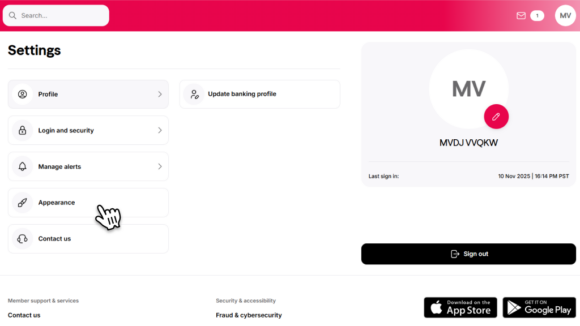
Step 2:
Select Appearance.
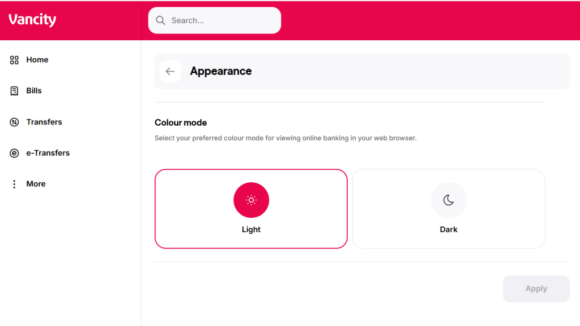
Step 3:
Choose Light or Dark mode.
Note: Light mode is the default if you haven’t saved any appearance settings.
Your app will automatically reflect your device’s appearance settings.
Accounts are now organized by Portfolios: Everyday Banking, Credit Cards, Borrowing, Investing, and Membership.
This design makes navigation easier and helps you find what you need faster. It also aligns with best practices for mobile and web experiences.
Tip: You can nickname your accounts to make them easier to organize and reference quickly.
For example, now that all chequing and savings accounts are listed under Everyday Banking, nicknames seamlessly help keep track of specific accounts for easy identification.