
Once logged in to Online Business Plus, click your profile icon near the top right. Select Login and security and navigate to Change password. Enter your current password and your new password. Confirm new password and click Confirm when ready.

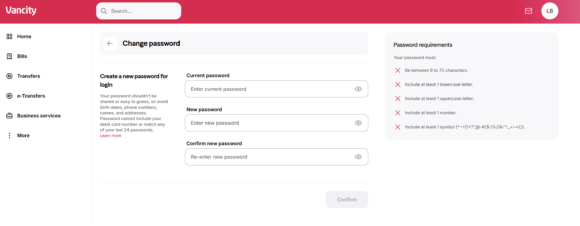
- The strong password must be between 8 and 25 alphanumeric characters long.
- The strong password can include a combination of upper- and lower-case characters and numbers.
- It should not be the same as the last 6 passwords for that user.
- We will also check all new passwords against a list of known insecure passwords, to prevent use of passwords that are common. This means some password changes will fail even though the new password meets the new structure requirements. If this occurs, please select a new password, or better yet, a passphrase.
What is a passphrase?
- Passphrases are an option for increasing the password strength. Passphrases (the longer the better) are a series of several words that are easier for us to remember than a random password of symbols and letters, and harder for computers to guess or brute force. One way to create a passphrase is to look around and choose three or more random words. For example: “deskchairphonemug” or “I LOVE Ice Cream day”.
Related posts:
 What are the processing times for my transactions in Online Business Plus?
 How do I enroll in 2-Step Security for Online Business Plus?
 How do I import my account activity into a third party finance software (such as Quicken® and QuickBooks®)?
 How do I view my Aviso Wealth or Qtrade Direct Investing accounts in online banking?